Hot-Swappable Adapters
Load and swap lightweight adapters at runtime. Fine-tune models for your game's style, characters, and specialized tasks without reloading the base model.
What Adapters Are
Model adapters are lightweight, fine-tuned modules that adjust a base model's behavior without replacing it. The current implementation uses LoRA (Low-Rank Adaptation), the most widely adopted adapter technique. Instead of retraining an entire model, which requires massive compute and produces a full-size copy, LoRA trains a small set of additional weights that steer the model's output. A typical LoRA adapter is 10–100 MB versus gigabytes for a full model.
Train an adapter on your game's dialogue style, a character's voice, your art direction, or a specialized task like sentiment detection. The adapter captures what makes your content distinct without duplicating the base model. As the ecosystem evolves, additional adapter formats beyond LoRA will be supported through the same API.
Runtime Hot-Swap
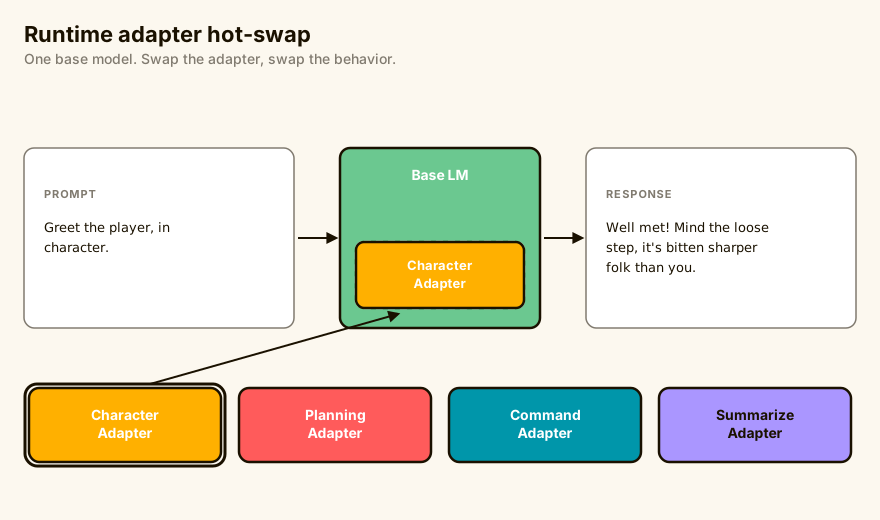
Switch between adapters at runtime without restarting or reloading the base model. The base model stays in memory; only the lightweight adapter weights are swapped.
// Load a character voice adapter
engine.llm().load_lora("tavern-keeper-voice").await?;

// Generate dialogue in that character's style
let dialogue = engine.llm().generate(prompt).await?;

// Swap to a different adapter. The base model stays loaded.
engine.llm().load_lora("merchant-voice").await?;
Swap time is near-instant since only the adapter weights change. This lets you use different adapters for different characters, locations, tasks, or game states within the same session.
Use Cases
Creative and Narrative
- Character voice. Train an adapter on each major character's dialogue to capture their speech patterns, vocabulary, and tone.
- Game-specific dialogue style. Match the writing style of your game (noir detective, high fantasy, sci-fi military) without prompt engineering.
- Image style adaptation. Train on your concept art to generate images that match your game's visual identity.
- Genre-specific behavior. Adapt how the model reasons about game mechanics, lore, or world rules.
Task-Specific
- Sentiment and toxicity detection. Classify player text or voice input in real time to detect hostile language, emotional tone, or intent, then adjust NPC responses or trigger moderation flows accordingly.
- Command recognition. Fine-tune an adapter to parse natural-language player commands into structured actions, improving accuracy for your game's specific vocabulary and mechanics.
- Planning and decision-making. Adapt the model to break complex objectives into step-by-step plans, useful for NPC goal-setting, quest generation, or strategic AI opponents.
- Summarization. Condense quest logs, conversation history, or world-state updates into concise recaps that fit within context windows or are displayed to the player.
- Domain-specific reasoning. Train adapters on your game's ruleset, lore database, or crafting system so the model produces answers grounded in your world's logic rather than general knowledge.
// Use a sentiment detection adapter on player input
engine.llm().load_lora("sentiment-classifier").await?;
let sentiment = engine.llm().classify(player_input).await?;

// Switch to a summarization adapter for quest recaps
engine.llm().load_lora("quest-summarizer").await?;
let recap = engine.llm().generate(quest_history_prompt).await?;
Works with LLM and Image Models
Adapters work with both text generation and image generation models. Use text adapters for dialogue, narrative, classification, and summarization. Use image adapters for visual style. Both support the same hot-swap workflow.
// Image generation with a style adapter
let image = engine.images().generate(
    "a crystal sword with blue glow",
    Some("fantasy-art-style")
).await?;